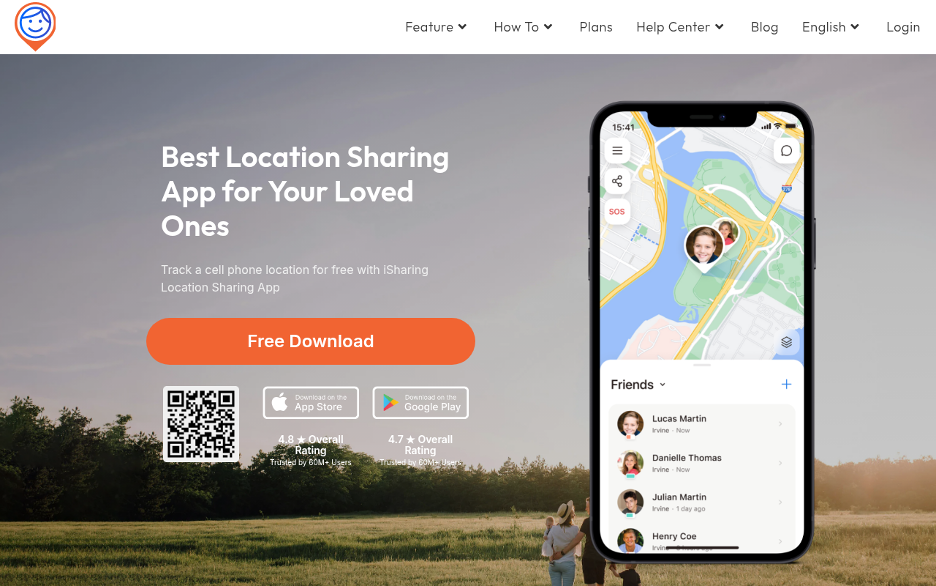
Keeping tabs on family members, whether a newly licensed teen or an aging parent living on their own, has become a day-to-day concern. Three apps handle most of that for US families: iSharing, Apple Find My, and Google Maps. Each takes a distinct approach, so the right choice depends on who you’re watching and what you need from the app.
Real-Time Location Sharing for Families and Groups
All three put live locations on a map, but that’s roughly where the common ground ends. iSharing is built for ongoing family location sharing, with safety tools included. Find My is Apple’s tightly integrated ecosystem tool. Google Maps location sharing is a convenience feature inside a general navigation app, not a dedicated family locator.
1. iSharing
iSharing, made by iSharingSoft, Inc. of Irvine, California, is a dedicated family locator. It organizes sharing inside private groups called Circles, where every member joins by invitation and controls their own privacy settings. The free plan covers live location, messaging, Panic Alert, and one place alert (a geofence notification when someone arrives at or leaves a saved place like school or home).
Paid plans go deeper. Driving Reports record each trip’s top speed, hard braking, rapid acceleration, and phone use at the wheel. Location history runs up to 365 days on Platinum, the longest of any app on this list. Panic Alert adds 10 seconds of recorded audio on paid plans and notifies family contacts only; it does not call 911. Inactivity alerts make it useful for keeping tabs on older parents, not just teens. This is exactly why parents researching best apps for tracking teenage drivers land on iSharing regularly.
iSharing at a glance: iSharing has 70M+ users worldwide and has operated since 2010. It works on iPhone, Android, tablets, Mac, and web (web on Platinum), and iPhone and Android users can share in the same Circle. Circles have unlimited members, included in the free plan. The free plan includes real-time location, messaging, Panic Alert, and 1 place alert. Paid plans add Driving Reports, 10-sec audio on Panic Alert, unlimited place alerts, and up to 365 days of history (Platinum). Pricing: Free plan available; premium from $7.99 with a 7-day free trial. Ratings: 4.8 on the App Store (approx. 36K) and 4.5 on Google Play (approx. 247K).
2. Apple Find My
Apple Find My is a free location service built into iPhone, iPad, Mac, and Apple Watch. It covers devices, AirTags, compatible accessories, and friends or family who opt in to share their location. It launched with iOS 13 in September 2019, folding the older Find My iPhone and Find My Friends apps into one.
Its standout capability is offline device tracking: Find My uses nearby Apple devices to relay the encrypted, anonymous location of a missing device even when it’s off Wi-Fi or cellular. Location sharing between people is mutual, and either person can stop at any time.
Find My also offers basic arrival and departure alerts. You can set a notification when a friend or family member arrives at or leaves a place, or isn’t at a place during a set schedule, up to 25 “Notify Me” notifications in total. What it lacks is the rest of a family safety kit: no driving reports and no Panic Alert. The bigger limit is the platform. Find My is Apple-only, so Android users can’t take part, which rules it out for mixed-device families.
3. Google Maps
Google Maps lets users share their real-time position with people who have a Google account, for a set time or until they turn it off. It works on Android and iOS, a reach Find My can’t match.
Google Maps also supports basic arrival and departure alerts. When someone shares their location with you, you can add a notification for when they arrive at or leave a place, up to 5 per person. These aren’t available for sharing via a link. Beyond that, Google Maps is a navigation app, not a family safety tool: no driving reports, no Panic Alert, no inactivity alerts, and no location history designed for family review.
Privacy and Data Collection
Apple says Find My location data is encrypted and that it doesn’t see user locations during normal use. Google Maps feeds into Google’s broader data ecosystem, and location history is tied to a Google account unless users turn it off. iSharing’s App Store privacy label lists location, contact info, identifiers, and usage data, with some information used for third-party advertising on the free plan. Paid plans remove ads.
How the Three Apps Compare
Data checked November 5, 2026.
|
|
iSharing | Apple Find My | Google Maps |
| Platforms | iPhone, Android, tablets, Mac, web (Platinum) | Apple devices only | Android and iOS |
| iPhone + Android in one group | Yes | No | Yes |
| Price | Free plan; premium from $7.99, 7-day trial | Free | Free |
| Arrival/departure alerts | 1 free; unlimited on paid | Yes (up to 25) | Yes (up to 5 per person; not via link) |
| Driving reports | Yes (paid) | No | No |
| Panic Alert | Yes (10-sec audio on paid) | No | No |
| Inactivity alerts | Yes (paid) | No | No |
| Location history | Up to 365 days (Platinum) | Not offered for people | Not designed for family review |
| Members | Unlimited in Circles (free) | Family Sharing group | Not confirmed |
Bottom Line
iSharing is the only one of the three that combines iPhone and Android support, Driving Reports, Panic Alert, inactivity alerts, and up to 365 days of history in a single family app. Apple Find My is the strongest free pick for all-Apple households that want device recovery and simple mutual sharing with basic arrival alerts. Google Maps is the practical choice for casual, short-term sharing across Android and iOS. Which works best comes down to the devices everyone carries and how much ongoing visibility you need.